Package Your Research: Why And How To Turn Your Data Into An R Package
School of Biological Sciences, Waipapa Taumata Rau
2026-07-02
The guide this talk follows
Everything today comes from one free online chapter:
- Data packages, in rstudio4edu: https://rstudio4edu.github.io/rstudio4edu-book/data-pkg.html
If you want the written version to work through later, start there. This talk is a live run at the same workflow.
Go deeper
Two books cover the full picture:
- R Packages (2e), Wickham & Bryan: https://r-pkgs.org
- Happy Git with R, Bryan: https://happygitwithr.com
The first is the reference for everything package-related. The second is the one to reach for the moment Git misbehaves.
Who am I?
- I’m a researcher working on the taxonomy and ecology of New Zealand weevils.
- I’m based in Tāmaki Makaurau
- I spend a lot of time in museum collections or up mountains looking for weevils
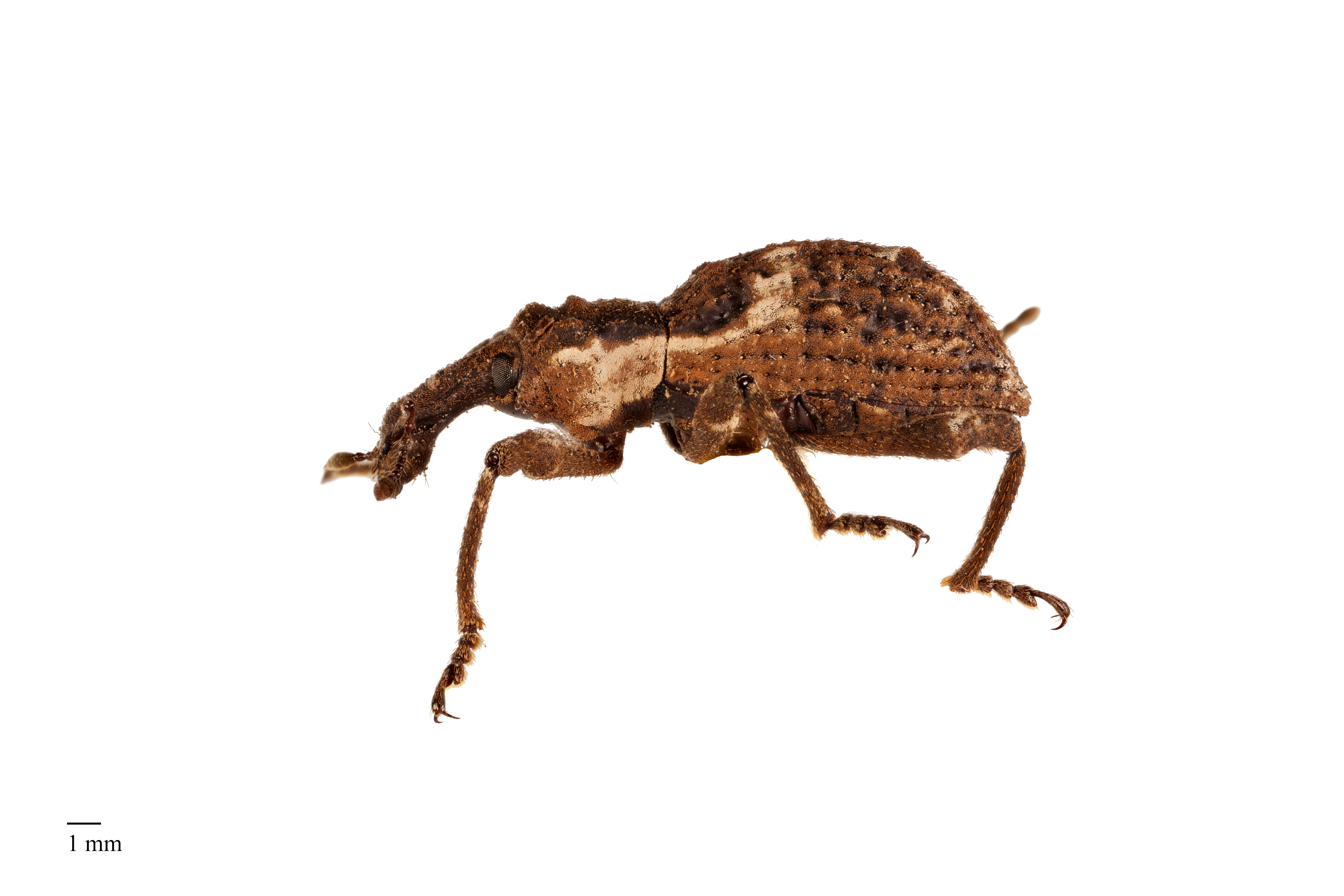
I produce data that is used in different projects
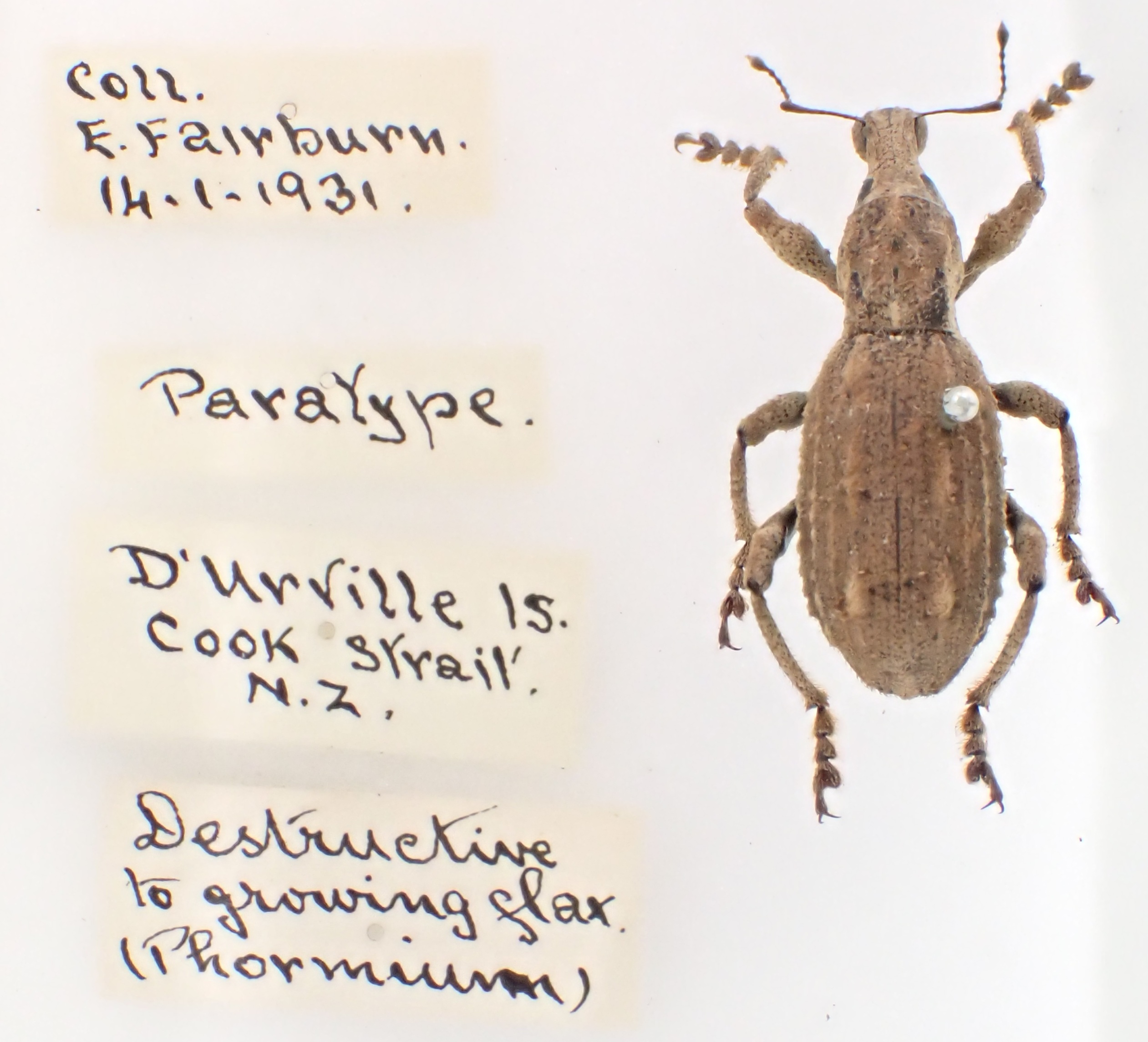
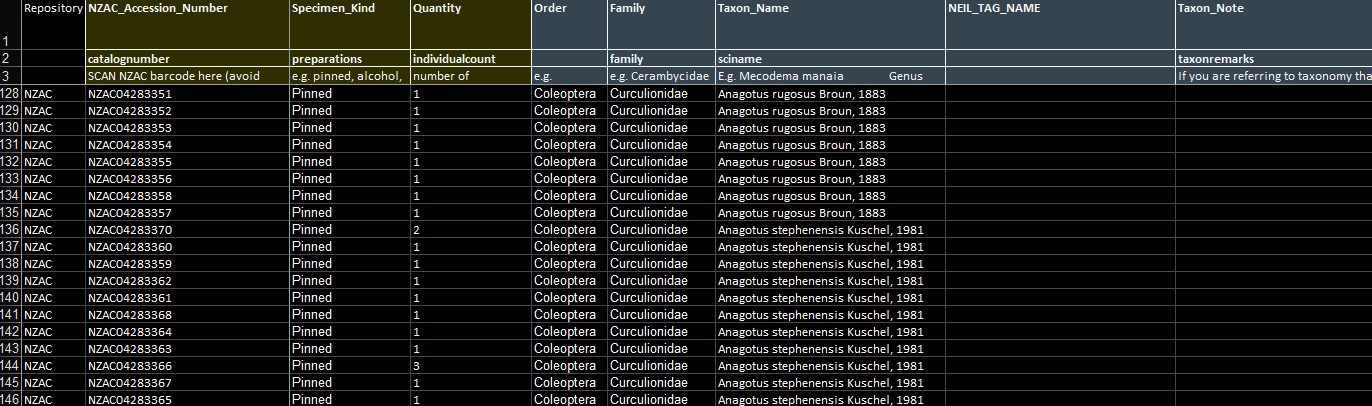
- A database of specimen records for Anagotus spp. (large flightless weevils, endemic to NZ)
- From many different institutions
- This data gets used in different projects: taxonomic revisions, ecological modelling, outreach, etc.
The problem: one copy, many projects
- I started off with the data on my laptop
- Copying the csv file to each project was error-prone
- I wanted a single canonical version of the data, that could be updated and shared easily
The problem: who needs to reach it?
- How do I make this data easily accessible?
- For my projects
- For collaborators
- For reviewers
- For the wider community
What I tried, and why none of it stuck
- I tried lots of things:
- hosting a
.csvon Google Drive, Dropbox - airtable
- I tried creating a very complicated github project
- hosting a
The solution
- A data package
- A standardised way to share data in R
- A data package is a normal R package, but it contains only data and documentation
- Can be hosted on a platform such as github or uploaded to CRAN
Why bundle data into a package?
A lot of data ends up shared as a .csv over email, or a Supplementary File on a journal site, or a path that only works on one machine.
A data package does better. Once it exists, anyone gets the data in three lines:
What are the benefits?
You get:
- One canonical version of the data, citable with a DOI
- Built-in documentation:
?df_something - Lazy-loaded
tibble, fast to read - Versioned through Git, archived on Zenodo
- Anyone can install it in one line
The mental model: getting a fish ready for sushi
Four folders, four jobs:
data-raw/the raw fish: source CSVs and the scripts that clean themdata/the sushi roll: one tidy.rda, ready to serveR/the menu: what each column meansman/the chef at your table: the help page a user actually reads
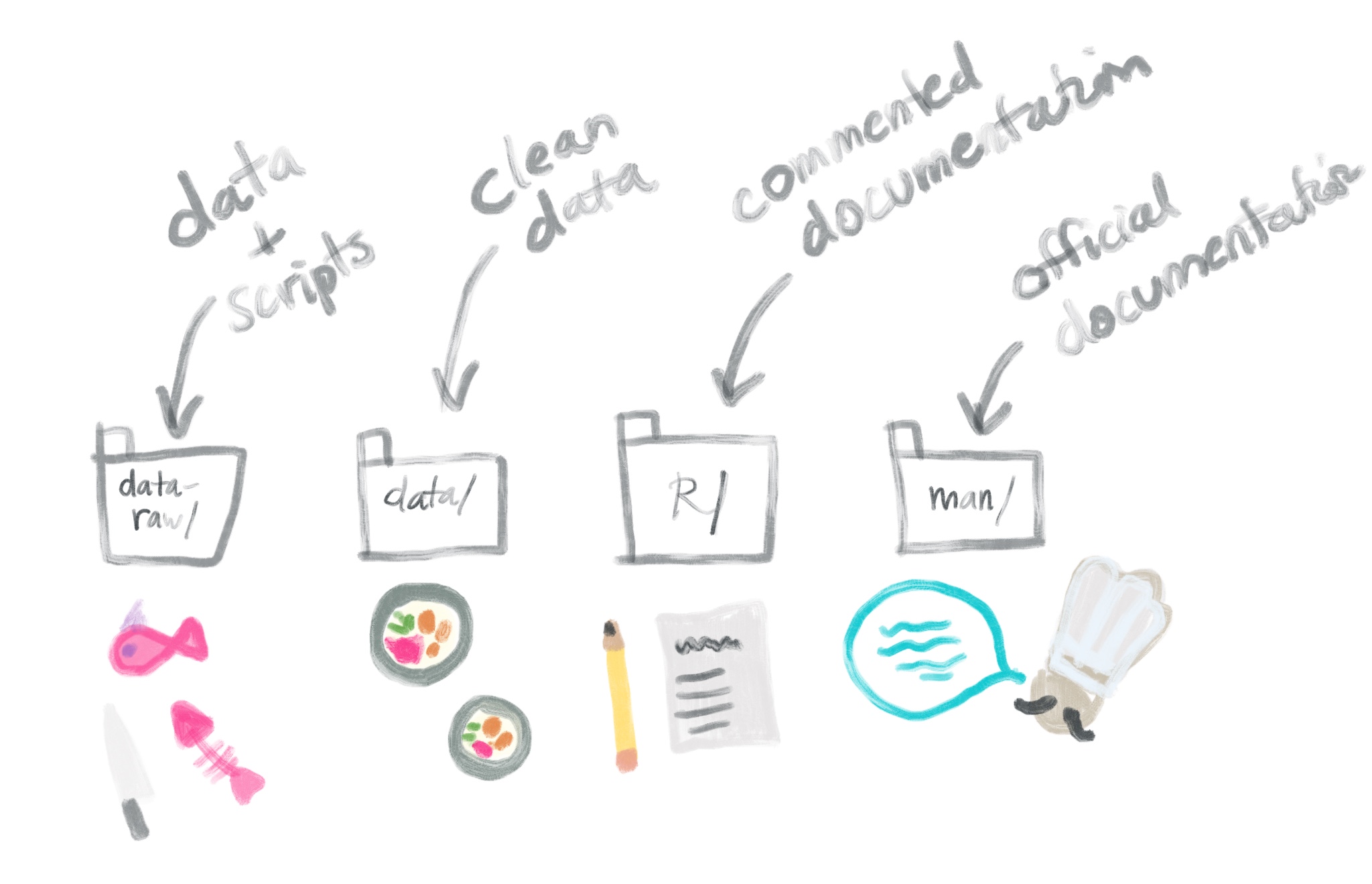
Illustration: rstudio4edu, CC BY-NC
Every stage from here maps onto one of these four folders.
The whole pipeline in one picture
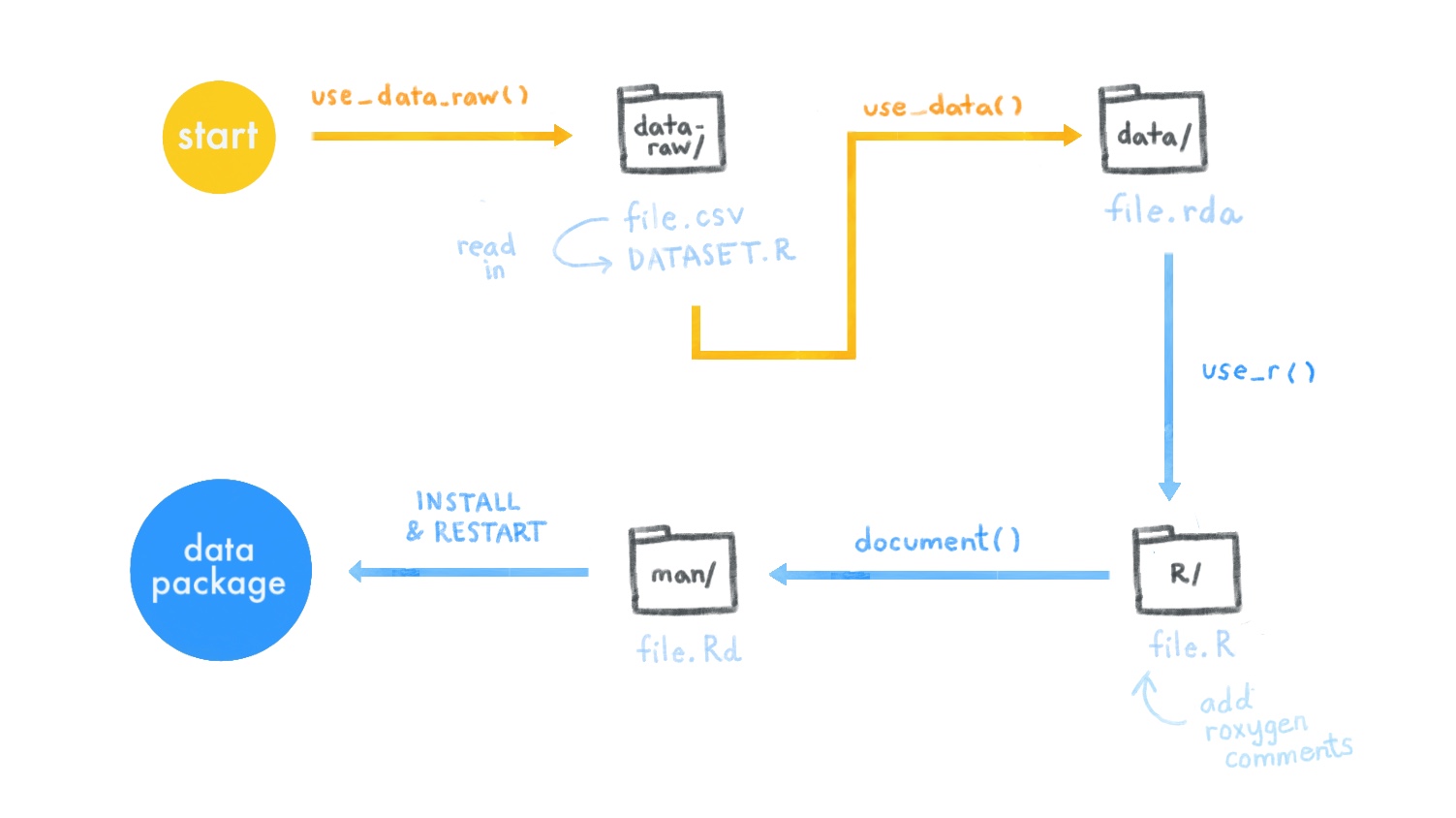
Illustration: rstudio4edu, CC BY-NC
Each function moves the data one folder to the right. That is the whole talk.
Mental framework: four folders
| Folder | Purpose | In our toy mothsurvey.data |
|---|---|---|
data-raw/ |
Raw CSVs and cleaning scripts (not shipped) | 1 source CSV, 1 cleaning script |
data/ |
Cleaned .rda files (shipped) |
df_moths.rda |
R/ |
Roxygen-documented .R files |
df_moths.R, mothsurvey.data-package.R |
man/ |
Auto-generated .Rd help files |
df_moths.Rd, mothsurvey.data-package.Rd |
Plus the root: DESCRIPTION, NAMESPACE, LICENSE, README.md.
Raw data → cleaned object → documented object → installable, citable package.
Assumptions
- A GitHub account and basic Git (clone, commit, push)
- Comfortable in the IDE (e.g., RStudio, VScode, Positron)
- Difference between an
.Rscript and a.qmdor.rmd - Reading and tidying data with the tidyverse
Tip
If anything above is shaky, the two books from the start of the talk (Happy Git with R and R Packages 2e) are the places to go.
What we’ll build
We’ll build a small package live: a toy called mothsurvey.data, five rows of light-trap moth counts.
- Scaffold the package and connect it to GitHub
- Drop a raw
.csvintodata-raw/with a cleaning script - Export the cleaned object as
.rdaindata/ - Document the dataset with Roxygen →
man/ - Fill in
DESCRIPTION, choose a license - Document the package itself
- Build, check, install
- Ship to others via
install_github()
At the end we’ll look at the same workflow at real scale, in my own package anagotus.data.
Part 1 · Get set up
Empty repo → package scaffold
Packages you’ll need
Three workhorses:
usethis: scaffolds files and foldersdevtools: builds, checks, documents, installsroxygen2: turns#'comments into.Rdhelp files
Note
Everything that follows should work similarly in Positron. References to the “Build pane” map to Positron’s package commands.
Getting-started workflows
Recommended: GitHub first
- Create empty repo on GitHub (no README, no
.gitignore) - Copy the clone URL
- IDE → New Project → Version Control → Git
- Paste URL, click Create
- In console:
Choose No when asked about overwriting.
A second IDE session opens with package-building tools enabled. Use that one.
A note on naming
The package name is the repo name. Rules:
- Letters, numbers, and
.only - Must start with a letter
- Must not end with
.
Our demo package is mothsurvey.data, using the <topic>.data convention: a clear signal that it’s a data-only package. Other patterns you’ll see in the wild:
nzcarabidae,pollinatortraits: short, no separatorlepidata,mothdata.nz: topic-firstweevilSpecimens: camelCase (works but less common)
Hyphens and underscores are not allowed in package names. Dots are.
Part 2 · Clean data
🎣 data-raw/ → 🍣 data/
Scaffold data-raw/
This creates:
data-raw/(added to.Rbuildignore, so it doesn’t ship)- A starter script
data-raw/DATASET.R
data-raw/ is the messy workspace. Cleaning here can use tidyverse, sf, janitor, lubridate, anything: those packages do not become dependencies of your shipped package.
Drop in the raw data
Our toy source, data-raw/moth_counts.csv, five nights of light-trap catches:
site,date,species,count
Cascade Kauri,2025-01-12,Declana floccosa,3
Cascade Kauri,2025-01-12,Epiphryne verriculata ,1
Waharau,2025-01-19,declana floccosa,2
Waharau,2025-01-19,Epiphryne verriculata,5
Cascade Kauri,2025-02-02,Declana floccosa,4
Deliberately messy: a trailing space on one species, an inconsistent capital, and dates stored as text. Real data always arrives like this.
One small cleaning script
data-raw/moth_counts.R:
One read, three small fixes. That’s the whole cleaning step for the toy. The point is that data-raw/ is where arbitrary tidying lives.
Save it, then verify
At the end of the script:
Writes data/df_moths.rda, the shipped artefact.
Why .rda and not .csv?
- Faster to load than parsing text
- Preserves column types (
<chr>,<dbl>,<date>,<fct>) exactly - Lazy-loaded, available the moment users attach the package
- Compressed by default
The cost: it’s binary. But you keep the source CSV in data-raw/ for diff-friendliness, and the cleaning script is the audit trail.
Part 3 · Check
Does R agree this is a package?
Run the check
First-time output usually includes:
❯ checking for missing documentation entries ... WARNING
  Undocumented data sets: 'df_moths'

❯ checking data for ASCII and uncompressed saves ... WARNING
  package needs dependence on R (>= 2.10)
Both are expected. The dataset isn’t documented yet, and the dependency line is missing from DESCRIPTION. Fixed next.
Part 4 · Document the dataset
🍣 data/ → 📋 the menu (R/ and man/)
Write the Roxygen block
Creates R/df_moths.R. Add the documentation above the dataset name:
#' Light-trap moth counts from two Auckland sites
#'
#' A small toy dataset of nightly light-trap catches, used to
#' demonstrate how to build an R data package.
#'
#' @format A tibble with 5 rows and 4 variables:
#' \describe{
#'   \item{site}{chr Survey site name.}
#'   \item{date}{date Night of the survey.}
#'   \item{species}{chr Moth species (Lepidoptera: Geometridae).}
#'   \item{count}{dbl Number of individuals caught.}
#' }
#' @source Made up for teaching.
"df_moths"
The \describe{} block matters
It’s how a user knows what each column means without opening your code. Document every variable:
site: where the trap was rundate: the night of the survey (a real date, not text)species: the moth, with its family in bracketscount: how many came to the light
Four variables here. In a real dataset it might be fifteen, and this block is where future-you (and reviewers) will thank present-you.
Make the docs concrete
Walks every #' block in R/ and writes matching .Rd files into man/.
Tip
Re-run document() every time you edit Roxygen comments. The man/ folder is generated, never edit it directly.
Part 5 · Package metadata
DESCRIPTION, license, package-level docs
Fill in DESCRIPTION
The toy’s DESCRIPTION:
Package: mothsurvey.data
Title: Toy Light-Trap Moth Counts
Version: 0.1.0
Authors@R:
    person("Neil", "Birrell", email = "nbir012@aucklanduni.ac.nz",
           role = c("aut", "cre"),
           comment = c(ORCID = "0000-0002-7961-1626"))
Description: A tiny toy dataset of light-trap moth counts, used to
    demonstrate how to build an R data package.
License: MIT + file LICENSE
Encoding: UTF-8
LazyData: true
Depends: R (>= 3.5)
Imports: tibble
Roxygen: list(markdown = TRUE)
RoxygenNote: 7.3.3
What each field is doing for you
Authors@R: with an ORCID, you’re citableURL: points to both the repo and the pkgdown site (add these once it’s on GitHub)BugReports: wiresbug.report()to GitHub issuesDepends: R (>= 3.5): silences the ASCII/compression warningLazyData: true: datasets are available on attach, nodata()neededImports: tibble: lets datasets print as tibblesRoxygen: list(markdown = TRUE): use markdown in roxygen, not Rd syntax
License
The simplest defensible choice for shared research data is MIT:
Writes both LICENSE and LICENSE.md, and updates DESCRIPTION.
For data specifically you may prefer CC-BY or CC0. The principle is the same: pick one, name it in DESCRIPTION, ship the file.
Note
Unlicensed data is, by default, not freely usable. Choose something.
Package-level help page
Creates R/mothsurvey.data-package.R. With it open, run:
The file ends up as:
Then devtools::document() one more time. Now ?mothsurvey.data shows the package landing page.
Part 6 · Build and install
📋 → 🧑🍳 the finished package
Build and install
Build pane → Install and Restart, or:
A fresh R session loads. Then:
Note
Run devtools::check(document = FALSE) one final time. Aim for 0 errors, 0 warnings, 0 notes before pushing.
Part 7 · Deliver
Push, tag, share
Deliver
Commit, push, tag a release on GitHub. From there, anyone installs it in one line:
Tagged releases also trigger a Zenodo deposit (once you’ve connected the repo), giving you a versioned DOI for every release.
Updating workflow
When raw data or cleaning logic changes:
- Edit the CSV and/or the cleaning script
- Re-run it
- Update Roxygen if variables changed
devtools::document()devtools::check(document = FALSE), aim for clean- Build → Install and Restart
- Bump
VersioninDESCRIPTION, commit, push, tag release - Zenodo mints a new DOI; users re-install for the update
Put these steps in a comment at the bottom of your cleaning script. They live in the repo, not in someone’s head.
The whole build, one screen
# 1. Empty repo on GitHub → clone → open in IDE
usethis::create_package(getwd())

# 2. Raw CSV plus cleaning script go in data-raw/
usethis::use_data_raw()
# (drop moth_counts.csv and moth_counts.R there)

# 3. At the end of the cleaning script:
usethis::use_data(df_moths, overwrite = TRUE)

# 4. Document the dataset
usethis::use_r("df_moths")     # add roxygen comments

# 5. Document the package
usethis::use_package_doc()
usethis::use_tibble()
usethis::use_mit_license("Neil Birrell")

# 6. Build
devtools::document()
devtools::check(document = FALSE)
devtools::install()

# 7. Push to GitHub, tag a release. Done.
The real thing · anagotus.data
From five rows to two thousand
For example: anagotus.data
Label data for Anagotus spp. specimens (large flightless weevils, endemic to NZ) housed in museum collections.
- 2,145 specimen records
- 15 variables: institution code, catalog number, collector, date, coordinates, locality, species, etc.
- Collated from 8+ institutions (NZAC, MONZ, NHMUK, ANIC, CMNZ, AK, OMNZ, LUNZ, FRNZ)
- Released in conjunction with the Anagotus taxonomic revision submitted to NZJZ
What the real thing looks like
Same four folders, more of everything:
anagotus.data/
├── DESCRIPTION
├── NAMESPACE
├── LICENSE / LICENSE.md
├── README.md
├── _pkgdown.yml          # pkgdown site config
├── renv.lock             # pinned dependencies
├── R/
│   ├── df_anagotus.R              # roxygen for the dataset
│   └── anagotus.data-package.R    # package-level docs
├── data/
│   └── df_anagotus.rda
├── data-raw/
│   ├── run_me.R                   # orchestrator
│   ├── 1_anagotus_data_load.R     # load and clean all sources
│   ├── 2_create_rda.R             # export to data/
│   └── *.csv                      # 8 raw specimen CSVs
├── man/                  # auto-generated .Rd files
└── inst/
    └── CITATION
At scale: eight messy sources
The toy used one tidy CSV. The real package starts from eight, each with different column names, coordinate systems, and date formats.
data-raw/
├── 1_anagotus_data_load.R   # load and harmonise every source
├── 2_create_rda.R           # use_data() to save to data/
└── run_me.R                 # source the numbered scripts in order
Same folder, same use_data() at the end. The extra work is a run_me.R orchestrator and some sf coordinate wrangling. The pattern does not change, only the volume.
Going further: the extras
anagotus.data carries a few things the toy skips:
inst/CITATION: defines whatcitation("anagotus.data")returns_pkgdown.yml: config for the docs site at https://nbir012.github.io/anagotus.data/renv.lock: pins the exact package versions used to build the data, for reproducibility- Zenodo DOI badge in the README: long-term archival and citable releases
.github/: GitHub Actions for automated R CMD check and pkgdown rebuild on push
The inst/CITATION file
Lives at inst/CITATION (not data-raw/, not the root). The actual file:
bibentry(
  bibtype = "Manual",
  title   = "anagotus.data: Label Data for Anagotus Specimens",
  author  = person("Neil", "Birrell",
                   email = "nbir012@aucklanduni.ac.nz",
                   role  = c("aut", "cre"),
                   comment = c(ORCID = "0000-0002-7961-1626")),
  year    = "2025",
  note    = "R package version 0.1.0",
  url     = "https://nbir012.github.io/anagotus.data/"
)
Users get a properly formatted citation:
Install the real one
Same one line as the toy. That’s the whole point: a collaborator, student, or reviewer gets the data with a single command, documented and citable.
References
- The walkthrough: https://rstudio4edu.github.io/rstudio4edu-book/data-pkg.html
- R Packages (2e): https://r-pkgs.org
- Happy Git with R: https://happygitwithr.com
usethis: https://usethis.r-lib.orgdevtools: https://devtools.r-lib.organagotus.data: https://github.com/nbir012/anagotus.data
For the large datasets (I mentioned at the end)
git annex: https://git-annex.branchable.com
with:
dataLad: https://www.datalad.org/